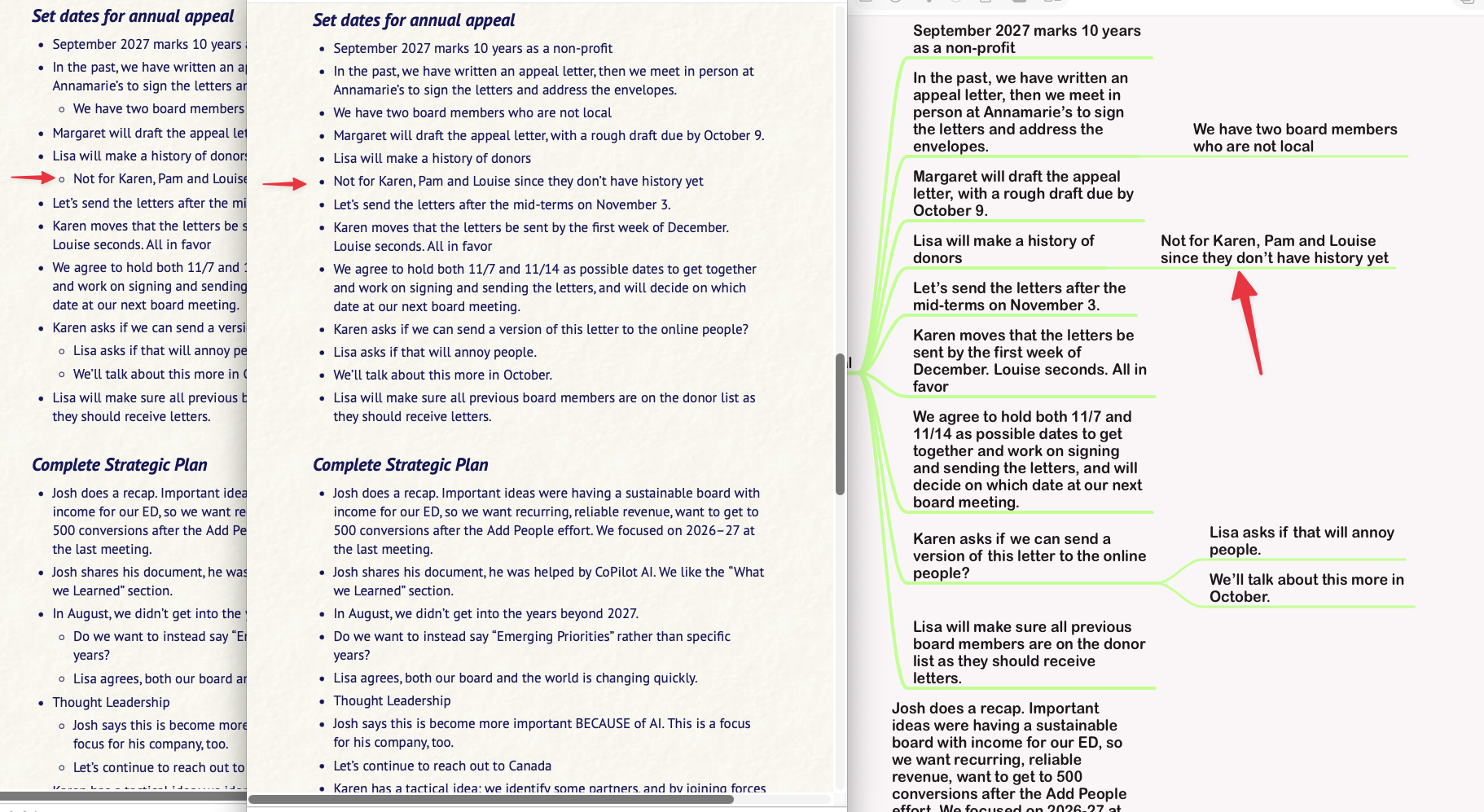
Bullet indents are not correct, Original file is in Mindnode

Viewed 35

Brett re Marked.png

In this screenshot, you can see MindNode on the right and the Marked direct preview of the MindNode file on the left. In the middle is the .md file created from Marked (from the view on the left).

Notice that all of the bullet indents beyond the first level are missing, such that all bullets are at the same level.

I've been a Marked user forever. I've used this workflow for years. But now it's messed up. I had to send a PDF instead of text because only the PDF (of the view on the left) had the indents properly.

What's changed? Do I need to change my workflow?

3 Answers

I initially misunderstood this bug report and thought it was something to do with the MindNode export, when in actuality it's an across-the-board bug in Marked's Markdown export. By using 2 spaces for the indent, the resulting Markdown's nested lists are only valid for about 60% of Markdown parsers. By changing it to use 4 spaces, it's now valid for all Markdown parsers. This will be in the next update.

What processor are you using? If MindNode is outputting 2-space indents, you need to use CommonMark or Discount to convert, not MultiMarkdown. If you provide an example mind map, along with your config settings, I can test. Use Help->Report an Issue to generate an email to which you can attach your mind map, along with the generated config zip.

I sent some files to Brett, he thinks there's a fix he can do in Marked that will fix this issue with the export from MindNode.