
I am not sure what happened, but now when I go to either export or print all content get shifted to the left. I have tried to adjust the print margins, etc, and nothing seems to stick. Landscape, portrait, fit to page, all shift left off page. Anyone have any tips on what I can check or if I am doing something wrong? TIA
3 Answers
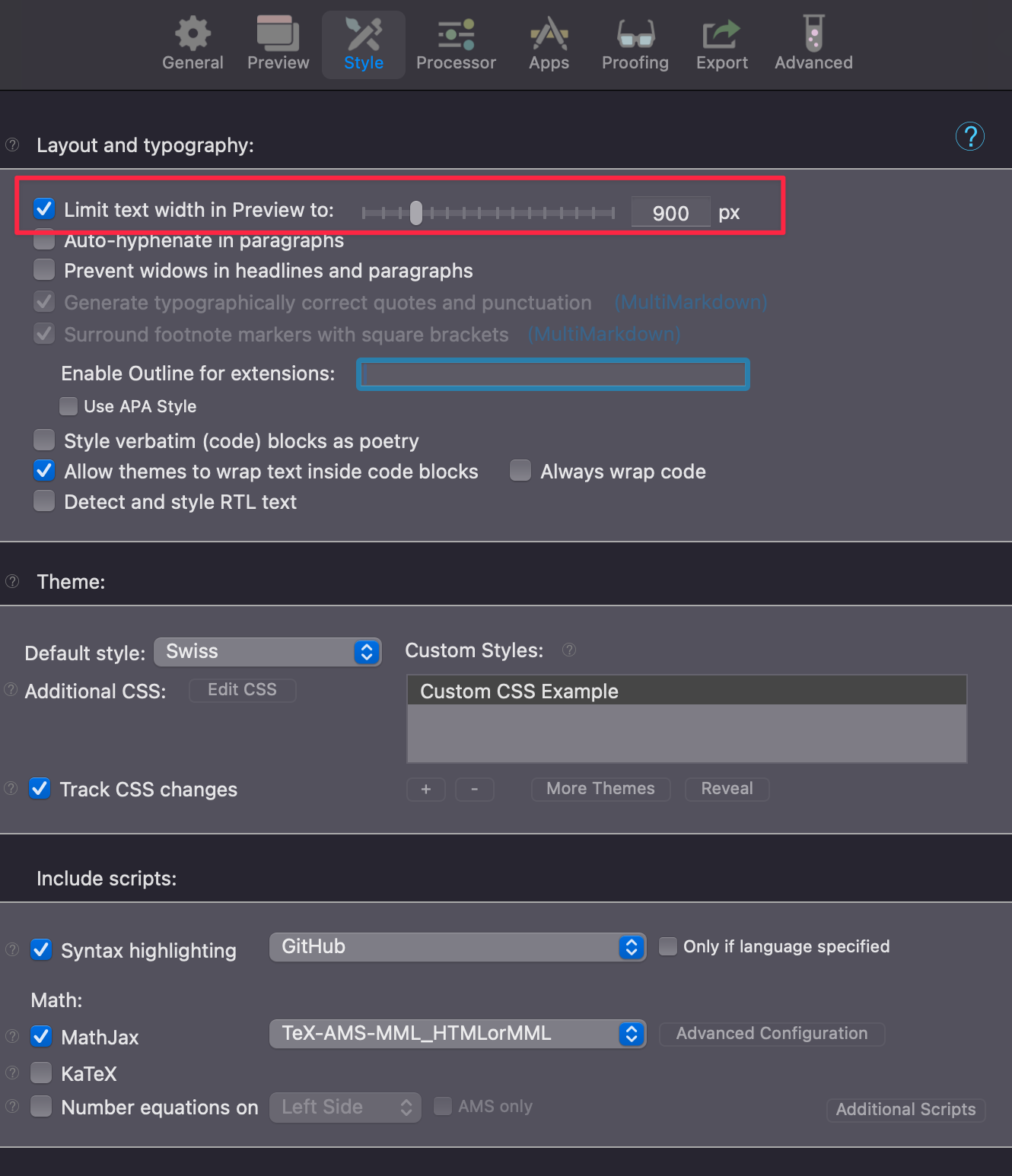
hey for me, when i enabled this option, it worked however you may need to also update the font size to 12 or more in the "Export" window else the the printed results are shown very small using font size of 10. hope this may help.

Hi @raghu - that did it. As soon as I clicked on that feature everything realigned. Thanks a bunch.
A few questions:
- When you say "exporting" do you specifically mean PDF export?
- Are you using a Custom Style?
- Does this issue apply to all Styles?
- Do you have any content in Settings->Style->Additional CSS?
- What are your print margins currently set to?
Please attach a PDF export that displays the issue as well.
Thanks!

Hi, thanks for the quick RE. No custom styles being used.
I should have said printing or export to PDF - happens to both.
Margins are all 30. No content in Additional CSS.
See attached for an example.
Based on the comment from @raghu , do you have anything set for the text width and base font size override? The content in your preview looks exceptionally wide, I think something is overriding the container width. And in regards to the 3rd question, does this happen with all of the built-in Styles?
Related